
On This Page
Most renewable energy software falls into one of two camps. Design tools size a plant but show nothing moving. Visualisations show a plant moving but compute nothing. Digital twin renewable energy simulation software does both: a 3D plant on real terrain whose every value, from steam flow to cell temperature, comes from a physics model you can change.
The ASFAN Renewable Energy Digital Twin puts seven real power plants in one Windows program, one per technology: geothermal, biomass, waste-to-energy, hydropower, green hydrogen (with green ammonia), wind and solar. Each plant is modelled from its operator's published figures and comes with its own physics model, Learn pages, scenarios and quiz bank.
Download the software, brochure and user manual
The Renewable Energy Digital Twin runs on Windows 10 and 11. The trial needs no key, no payment details and no account.
The user manual is also available in Arabic.
What makes it a digital twin, not an animation
The test is simple: change an input and see whether everything downstream changes with it. In the Renewable Energy Digital Twin it does, because the values come from equations, not from a designer's idea of what looks realistic.
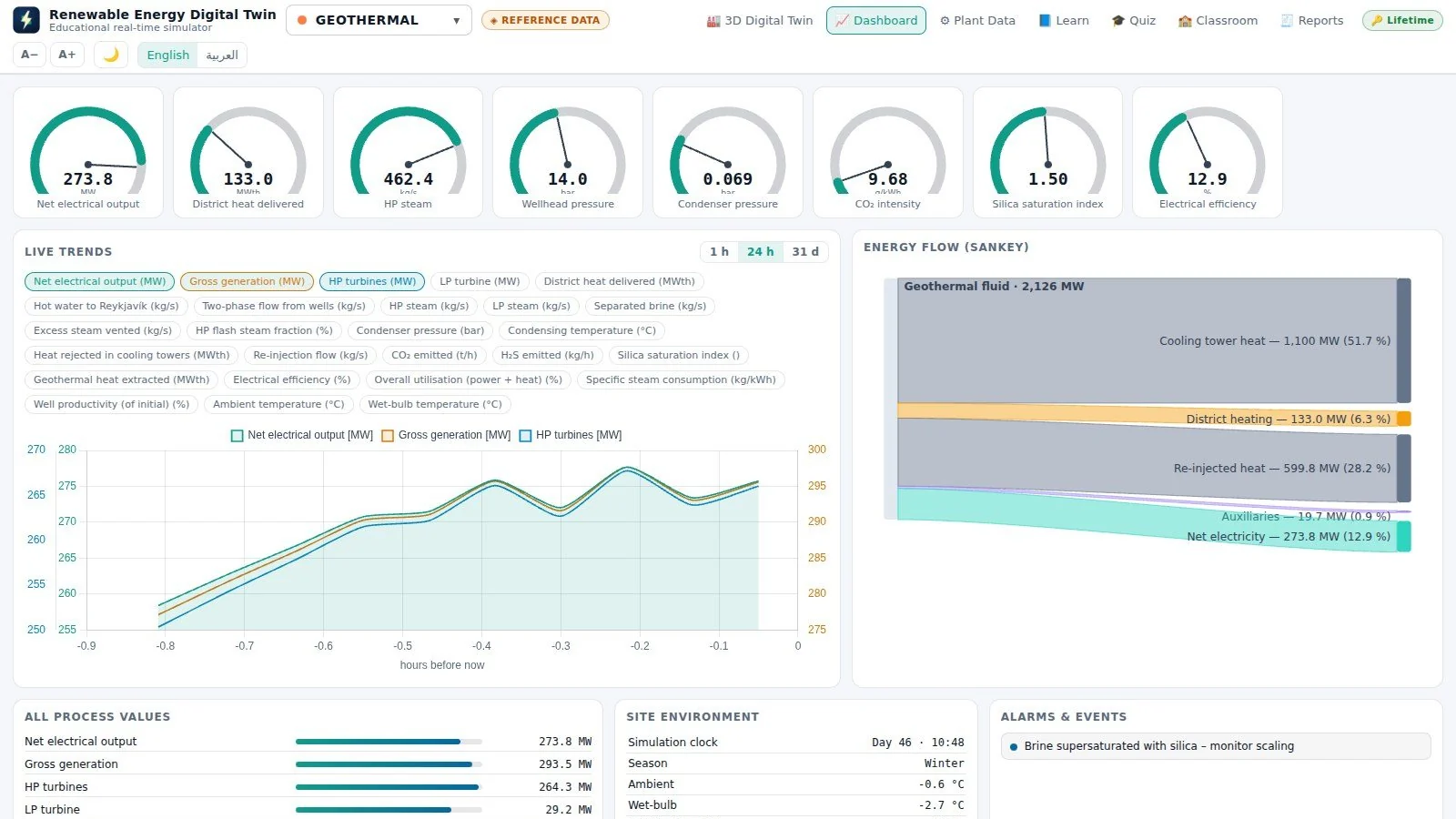
- 25 to 50 live process values per plant, each shown on the 3D label of the component it belongs to.
- Simulation speeds up to 1,800× (one hour per second), so a day of solar output or a month of reservoir drawdown fits into a lesson.
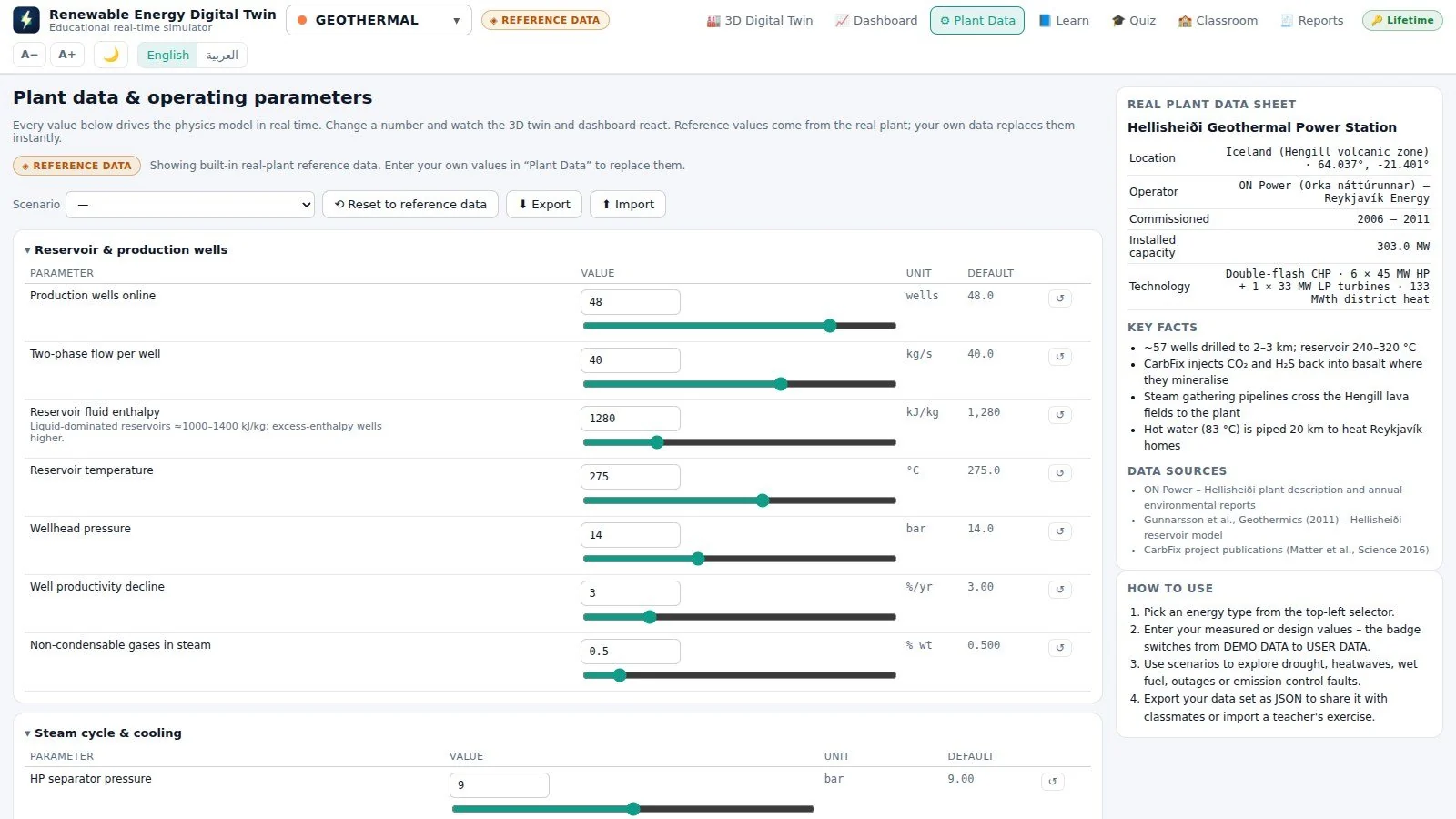
- Real reference data: each plant's parameters sit beside the operator's published values on the Plant Data page.
- Scenarios such as drought, heatwave, storm, dust storm, wet fuel or aged electrolyser stacks, applied with one click.
It is an educational simulator: the models rely on typical parameters for each technology and published design data, not on live operating data from the real plants.
The seven reference plants
Each plant has its own article with its data sheet, live gauges, scenarios and learning outcomes. Green ammonia is part of the NEOM plant and has its own guide.
| Technology | Reference plant | Country | Capacity | Dedicated guide |
|---|---|---|---|---|
| Geothermal | Hellisheiði Geothermal Power Station | Iceland | 303 MW + 133 MWth heat | Digital Twin Geothermal Simulation Software |
| Biomass | Drax Power Station | United Kingdom | 2,580 MW | Digital Twin Biomass Simulation Software |
| Waste-to-energy | Dubai Waste Management Centre, Warsan | United Arab Emirates | ≈ 200 MW · 1.9 Mt waste/yr | Digital Twin Waste to Energy Simulation Software |
| Hydropower | Aswan High Dam | Egypt | 2,100 MW | Digital Twin Hydropower Simulation Software |
| Green hydrogen | NEOM Green Hydrogen Project | Saudi Arabia | 2.2 GW electrolysis · 600 t H₂/day | Digital Twin Green Hydrogen Simulation Software |
| Green ammonia | NEOM Green Hydrogen Project (ammonia plant, Oxagon port) | Saudi Arabia | 1.2 Mt NH₃/yr | Digital Twin Green Ammonia Simulation Software |
| Wind | Dumat Al Jandal Wind Farm | Saudi Arabia | 400 MW · 99 turbines | Digital Twin Wind Turbine Simulation Software |
| Solar PV | Noor Abu Dhabi Solar Plant | United Arab Emirates | 1,177 MWp | Digital Twin Solar Panel Simulation Software |
What is inside the program
Seven pages, each doing one job, all driven by the same running physics model:
- 3D Digital Twin: the plant on its real terrain with satellite imagery, day and night lighting, moving steam, trucks, trains and turbines, and every component labelled with its live value.
- Dashboard: gauges with limit marks, trend charts over 1 hour, 24 hours or 31 days, a Sankey energy-flow diagram, every process value and the live alarm list.
- Plant Data: every operating parameter of the model, editable, with its reference value alongside, plus one-click scenarios.
- Learn: a compact course per technology: overview, the process step by step, the key equations, the plant data sheet, environment and a glossary.
- Quiz & Classroom: auto-graded practice and timed exams, questions on live data, printable certificates, and a class folder the supervisor reads without a server.
- Build your own plant: enter the design data of a plant you are planning, and the program builds its 3D twin and runs the physics on your numbers.
Who uses it and how
- Universities: energy, mechanical, electrical and chemical engineering courses use one twin per lecture, then the quiz bank for assessment.
- Technical institutes and training centres: trainees run abnormal scenarios they would never see on a real site, safely and as often as needed.
- Practising engineers: the plant builder turns early design numbers into a running model for discussion with clients and colleagues.
For equipment-level practice in virtual reality, ASFAN also offers VR renewable energy training. For power-system education across the Arab world, see the Arab Power Digital Twin.
How to choose renewable energy simulation software
| Question to ask | How the Renewable Energy Digital Twin answers |
|---|---|
| Is every displayed value computed? | Yes, from a physics model per technology, with reference values shown alongside. |
| Does it run offline? | Yes. No server and no internet needed; the licence is checked locally. |
| Can students break things? | Yes. One-click abnormal scenarios per plant, from droughts to aged stacks. |
| Is assessment built in? | Yes. Practice and timed exams, live-data questions, certificates and class results. |
| Arabic interface? | Yes. Fully bilingual with right-to-left layout, manual and brochure in both languages. |
| Can I license only what I teach? | Yes. Choose all seven technologies or a selection, monthly or annual. |
Trial, licences and system requirements
The 14-day trial opens all seven 3D digital twins with live values, camera presets and day/night lighting, every Learn page, both interface languages and simulation speeds up to 10×. A licence unlocks the dashboard, Plant Data and scenarios, the quiz and certificates, reports and data export, the faster simulation speeds, the plant builder and Classroom mode. Licences are monthly or annual and can cover all seven technologies or only the ones you teach; supervisor licences add the Classroom results table.
- Operating system: Windows 10 or 11, 64-bit
- Memory: 4 GB minimum, 8 GB or more recommended
- Graphics: any chip with WebGL 2 (Intel HD 500 series or newer)
- Disk: 600 MB minimum, 1 GB recommended
- Internet: not required; used only for automatic updates and satellite imagery
- User rights: standard user, no administrator password
FAQ: Digital Twin Renewable Energy Simulation Software
What is digital twin renewable energy simulation software?
It is software that rebuilds renewable power plants as 3D models driven by physics simulations, so every value on screen is calculated from the plant's parameters rather than played back. The ASFAN Renewable Energy Digital Twin covers seven real reference plants in one Windows program.
Which renewable technologies are included?
Geothermal (Hellisheiði), biomass (Drax), waste-to-energy (Warsan, Dubai), hydropower (Aswan High Dam), green hydrogen and green ammonia (NEOM), wind (Dumat Al Jandal) and solar PV (Noor Abu Dhabi).
Who is the software for?
Engineering and energy students, universities, technical institutes, training centres and practising engineers who want to see how a renewable plant behaves before they meet one. It is an educational product, not an operational tool.
Does it need a server or an internet connection?
No. It runs entirely on the computer, the licence is checked locally and Classroom mode uses an ordinary shared folder. The internet is used only for automatic updates and satellite imagery.
Can I buy only some of the technologies?
Yes. A licence can cover all seven energy types or a selection, and can be extended later with a new key.
Is the interface available in Arabic?
Yes. The program is fully bilingual, English and Arabic with a right-to-left layout, and the user manual and brochure are available in both languages.
Client & Visitor Reviews
Share your experience, feedback, or opinion about this page content.
Write a Review
Latest Reviews